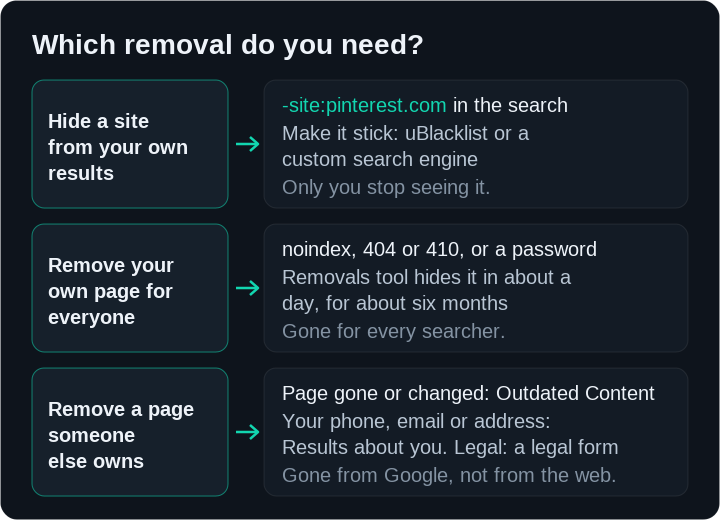
This search means two different things. To stop seeing a website in your own Google results, type -site: and its address after your search, like best laptop -site:pinterest.com. To remove a page you own for everyone, add a noindex tag or delete the page, then hide it fast with the Removals tool in Google Search Console.
A page someone else owns is harder. Google removes it only in a few cases, such as when the page is already gone, shows your home address, or breaks the law.
We also tested -site: on 589 Google searches on November 11, 2026. It hides normal websites well. It often fails on YouTube and Reddit, and one click fixes that.
Which kind of removal do you need?
Find your goal in the table. Each row has its own section below.
| Your goal | What to do | Who stops seeing it | How long it lasts |
|---|---|---|---|
| Skip a site in one search | Add -site:example.com to the search | Only you | That one search |
| Block a site in every search | A blocklist extension or a custom search engine | Only you, in that browser | Until you remove it |
| Remove your own page | noindex tag, a 404 or 410 status, or a password | Everyone | For good |
| Hide your own page fast | Removals tool in Search Console | Everyone | About six months |
| Remove a page you don’t own | Outdated content tool, Results about you, or a legal request | Everyone, if Google agrees | Depends on the route |
How do you exclude a website from Google search?
Put a minus sign in front of the site: operator. Google’s help page covers both parts: a minus sign leaves out a word, and site: limits results to one site. Together they leave out a site.
- Type your search as usual.
- Add a space, then
-site:and the domain. Leave no space after the minus sign or the colon. - Press Enter.
chocolate chip cookies -site:pinterest.comTo hide more than one site, add more of them:
chocolate chip cookies -site:pinterest.com -site:youtube.comA few details help:
- Subdomains go too. Google says
site:matches a domain and its subdomains. So-site:example.comalso hides recipes.example.com. - You can target a folder. The
site:operator also takes the start of an address, like-site:example.com/blog. - It works on phones and in the Google app, because it is part of the search itself. It lasts for one search only.
Our list of Google search operators covers the other commands you can mix in, like quotes and before:.
Why does -site:youtube.com still show YouTube videos?
On the normal results page, the minus trick often misses videos, forum threads and social posts. In our test, YouTube still showed in 61 of 87 searches that excluded it. Reddit still showed in 31 of 76.
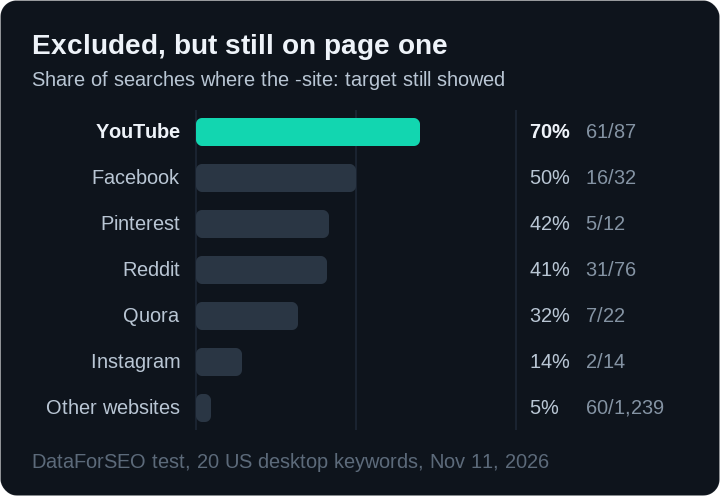
Normal websites behaved. They slipped back in only 60 times out of 1,239 (5 percent). The leaks were mostly YouTube videos, Reddit threads and Facebook posts. On the page, these show a channel name or a comment count where a web address would normally be.
The fix: use the Web filter
Click Web in the row of filters under the search box. On a computer it may hide under More. You can also add &udm=14 to the end of the search address. Google says the Web filter “displays only text-based links”.
To check it, we took the 25 searches where a platform had slipped through earlier that day. We ran each one twice in the same minute, once on the normal page and once with the Web filter.
| Results page | Searches where an excluded platform still showed | Excluded platforms that showed |
|---|---|---|
| Normal (All) | 22 of 25 | 27 of 37 |
| Web filter (udm=14) | 0 of 25 | 0 of 37 |
So -site: plus the Web filter is the most reliable way we found to hide YouTube or Reddit. The Web filter also drops AI Overviews and video blocks. Our guide to turning off AI Overviews shows how to make it your default search.
How many sites can you exclude in one Google search?
Google ran every search we sent, up to 30 exclusions. But the longer the list, the less you can trust it.
| Sites excluded | Normal websites that still showed | YouTube, Reddit and social sites that still showed |
|---|---|---|
| 1 | 0 of 13 | 4 of 7 |
| 3 | 0 of 38 | 12 of 22 |
| 5 | 1 of 70 | 15 of 30 |
| 10 | 11 of 158 | 25 of 42 |
| 15 | 14 of 250 | 24 of 47 |
| 20 | 15 of 329 | 25 of 50 |
| 30 | 19 of 381 | 18 of 47 |
With up to five sites, normal websites stayed hidden in 120 of 121 cases. With 10 or more, about 1 in 20 came back. Some were big names. CNN, Best Buy, Home Depot, Yelp and IKEA each showed up after we excluded them.
Old guides say Google reads only the first 32 words of a search. We tried to check that by moving one exclusion to word 30, 33 and 40. We could not confirm it. Results for such long searches swung so much that the target site showed up about as often without the exclusion as with it, 5 to 8 times in 20.
Our advice: keep each search to five exclusions or fewer. For a longer block list, use an extension, covered below.
Does -site: change the rest of the results?
Yes, a lot. Any -site: changed which sites Google showed, even when the site we excluded was never on the page.
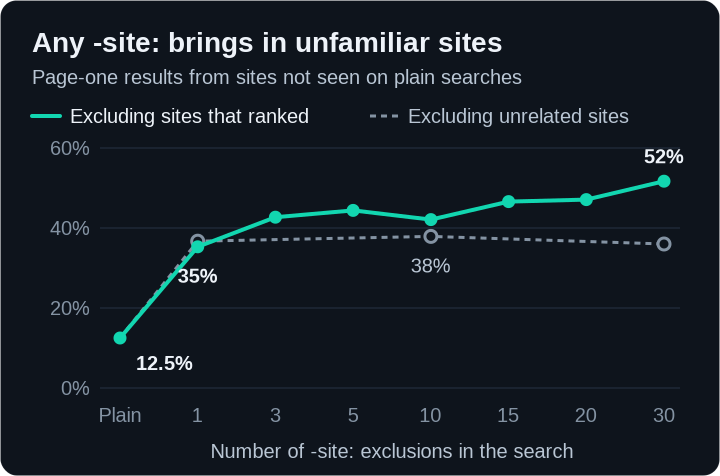
On plain searches, 12.5 percent of page-one results came from sites we had not seen on the other plain checks. That is normal churn. With one -site:, the share jumped to about 35 percent. It barely mattered whether we excluded a site that ranked (35 percent) or an unrelated one like nasa.gov (37 percent). With 30 exclusions of sites that ranked, it reached 52 percent.
What filled the gaps? Across 217 pages with -site:, we counted 32 Yahoo results, 30 from Quora, 21 from Instagram and 19 from Yelp. The 60 plain pages had 2, 3, 1 and 0. Lemon8, a social app, showed up 22 times with -site: and never on a plain page.
The sharpest case was “best running shoes”. We excluded one site, The Run Testers. Eight sites we did not touch vanished with it, including Runner’s World, Reddit, Men’s Health and Dick’s Sporting Goods.
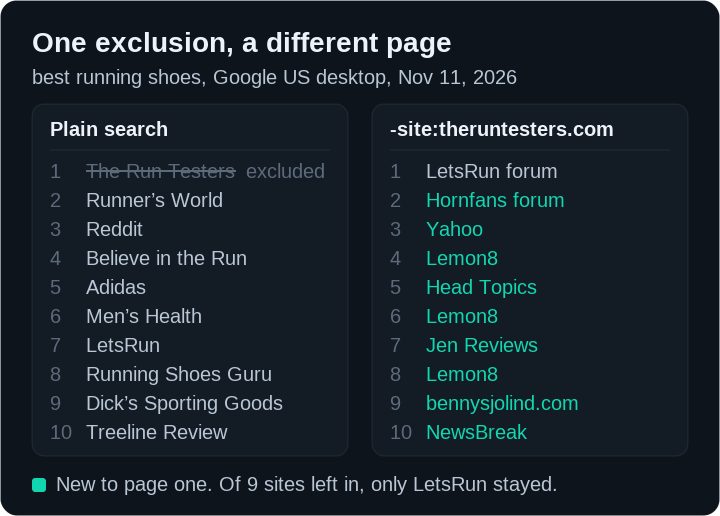
In their place came Yahoo, three Lemon8 posts, a Hornfans forum thread, Head Topics and NewsBreak. We got the same page again five minutes later. A third try, ten minutes after the first, looked normal. So if a page looks worse after you exclude a site, it probably is.
How to block a website from Google search results permanently
Google once had a button for this. It added Blocked Sites in 2011 and shut it down in March 2013. Today you have two good options, and both work only in your own browser.
Option 1: a blocklist extension
uBlacklist is a free, open source extension for Chrome, Firefox, Edge and Safari. It hides the sites you pick from Google results, and from Bing, DuckDuckGo and other engines. Your list can sync between devices. Check what access any extension asks for before you install it.
Option 2: a custom search engine with the exclusions built in
Chrome, Edge and Firefox let you add a search engine with your own address. Put the exclusions and the Web filter right in it:
https://www.google.com/search?q=%s+-site:pinterest.com+-site:quora.com&udm=14In Chrome, the steps from Chrome’s help page are:
- Open Settings, then Search engine, then Manage search engines and site search.
- Next to Site search, click Add.
- Enter a name, a shortcut, and the address above. Click Add.
- Click the three-dot menu next to the new entry and choose Make default.
Every search then hides those sites and uses the Web filter. Keep the list short, for the reasons in our test. Steps for Edge and Firefox are in the AI Overviews guide linked above.
One old trick is gone. Google’s Programmable Search Engine used to search the whole web minus the sites you chose. Since January 20, 2026, new engines can only search up to 50 sites you list, as our guide to the Custom Search API shutdown explains.
How to remove your own website or page from Google
You need two things: a permanent fix on your site, and a quick hide in Search Console if you are in a hurry. Google’s removal guide lists three permanent fixes.
Step 1: Pick a permanent method
| Method | What to do | Use it when |
|---|---|---|
| Delete the page | Make the address return a 404 or 410 status | Nobody needs the page anymore |
| noindex | Add a robots meta tag or an X-Robots-Tag header | People should reach the page, just not from Google |
| Password | Put the page behind a login | Only some people should see it |
The noindex tag goes in the page’s <head>:
<meta name="robots" content="noindex">For PDFs and other files, send the header X-Robots-Tag: noindex instead. Both are in Google’s noindex docs.
404 or 410? It does not matter. Google says all 4xx errors except 429 are treated the same. An indexed page that returns one is removed from the index.
Google also points out that noindex only works on search engines that respect it. Deleting or changing the content is the safest way to keep it out of all of them.
Step 2: Hide it now with the Removals tool
A noindex tag or a 404 works only after Google visits the page again. Google warns that this can take months. The Removals tool hides the page much sooner.
- Open Search Console and pick your site. You must be a verified owner.
- Go to Removals and open the Temporary Removals tab.
- Click New Request and choose Temporarily remove URL.
- Pick Remove this URL only and paste the full address. To hide a folder or the whole site, pick Remove all URLs with this prefix.
- Click Next and submit.
Google’s help page says a request usually takes up to a day and lasts about six months. It covers both http and https, and both www and non-www. It does not cover other subdomains, like m. or amp. Addresses are case sensitive. When the six months end, the page can come back unless you did Step 1.
Step 3: Check that it is gone
- Search for it. Type
site:plus the page address into Google. If nothing comes back, it is out. Asite:search shows a sample, not a full list, as our guide to finding all pages on a website explains. - Inspect it. Paste the address into URL Inspection in Search Console. It shows if the page is indexed and lets you ask Google to crawl it again. The Search Console API can run the same check on many pages at once.
- Watch it. If you have many pages to track, a SERP API can run the same
site:search every day and return the results as data. You see the day a page drops out.
How to remove a whole website from Google
Use the Removals tool with Remove all URLs with this prefix and your home page address. That hides every page for about six months. In that time, add noindex to every page, return 404 or 410, or put the site behind a password.
Why robots.txt is the wrong tool
Do not block the page in robots.txt. Google says robots.txt “is not a mechanism for keeping a web page out of Google”. A blocked page can still show up, just without a description, if other sites link to it. Worse, Google cannot crawl the page to see your noindex tag.
If you blocked pages by mistake and want them back, read why your website is not showing up on Google. It is the same problem in reverse.
How to remove someone else’s page from Google
Start with the site owner. Google says removing a result from Search does not delete the page from the web. If the owner says no, Google lists these routes.
| Your situation | Where to go | Who can ask |
|---|---|---|
| The page is gone or has changed | Refresh Outdated Content tool | Anyone with a Google account |
| It shows your phone, email or home address | Results about you | You |
| Doxxing, intimate images, or images of a minor | Personal content removal request | You or someone acting for you |
| Copyright, a court order, or another legal issue | Legal removal request | The person whose rights are affected |
If the page is gone or changed
Use the Refresh Outdated Content tool. You do not need to own the site, but you must sign in to a Google account. Copy the link from the search result itself: right-click it and choose Copy link address. If the page still exists, Google asks for a word or two that is no longer on it.
Google’s help page explains the outcome. A removed page drops out of results. For a changed page, the old snippet goes away, and the result updates on Google’s next visit.
If it shows your contact details
Use Results about you. It finds results with your phone number, email or home address, and you can request removal from there. You can also open the menu next to a result, choose Remove result, and pick the contact info option. Google says these tools are rolling out to users over 18 in certain markets. Some pages, like government and school sites, may not offer the option.
If it is doxxing or intimate images
Use Google’s personal content removal request. It covers personal info used for doxxing, personal sexual content, images of minors, and sites with what Google calls exploitative removal practices. You or a representative can file it, as long as you are the person in the content.
If there is a legal reason
Use Google’s legal removal request for copyright and other legal claims. Give the exact URL, not the home page, and explain why it breaks the law. Google may block or limit the page in its own products, but it can still exist elsewhere.
Why is an old page still showing on Google?
Usually Google has not visited it since it changed. Check these three things.
- The page still loads with an error message. If it returns a normal 200 status, Search Console may flag it as a soft 404. Make it return a real 404 or 410.
- Google has not crawled it yet. Ask for a recrawl in URL Inspection, or use the Removals tool if the site is yours.
- The page lives at more than one address. Each address needs its own fix. Google asks for a separate request for each one.
How we ran the test
- Source. The DataForSEO Google Organic API (task_post), US English, desktop, signed out. All 589 searches ran on November 11, 2026, between 18:58 and 19:11 UTC.
- Keywords. 20 searches people often filter: 7 “best” product searches, 7 how-to searches, 2 recipes, 2 home ideas, 1 travel search and 1 health question.
- Baselines. For each keyword, one plain search 50 results deep, plus three plain page-one checks.
- Exclusions. We excluded the top 1, 3, 5, 10, 15, 20 and 30 sites from the plain top 50, in rank order. We also excluded 1, 10 and 30 unrelated government sites, like nasa.gov, as a control.
- Word limit. We moved one exclusion to word 30, 33 and 40, and ran the same searches without it. An earlier pass at words 31 to 34 is in the data too.
- Web filter. 26 searches ran twice in the same minute, with and without
udm=14, set through the API’s search_param field. 25 of them excluded a platform. - Matching. The API returned Google redirect links, not page addresses. We matched sites by the address shown under each result, or by the site name for YouTube, Reddit and other platforms.
Limits. One day, one country, desktop only. Google results moved a lot even without operators: two plain checks of the same search shared only 43 to 58 percent of their sites. Three of the 30-exclusion searches went over DataForSEO’s 700-character limit, so that row covers 17 keywords. We did not test the Removals tool for this guide, so those steps come from Google’s help pages. The test cost $0.81 in API fees.
Download the data (CSV). It has 589 rows, one per search, with the query, the sites on page one in order, and which excluded sites still showed.
Frequently asked questions
How do I exclude a website from Google search?
Type your search, a space, and -site: followed by the domain, with no space after the colon. For example: best laptop -site:pinterest.com. Add more sites with more -site: terms. It only lasts for that one search.
Why does -site:youtube.com still show YouTube videos?
On the normal All results, Google often ignores -site: for videos, forum threads and social posts. In our November 11, 2026 test, YouTube still showed in 61 of 87 searches that excluded it. Click the Web filter or add &udm=14 to the address. In 25 paired tests, the excluded platforms never showed there.
How many sites can I exclude in one Google search?
Google ran our searches with up to 30 exclusions, but they got less reliable as the list grew. With 1 to 5 exclusions, normal websites came back once in 121 cases. With 10 to 30, about 1 in 20 came back. Keep it to five or fewer, and use an extension for a longer list.
How long does it take to remove a page from Google?
The Removals tool in Search Console usually handles a request within a day and hides the page for about six months. A noindex tag or a 404 works once Google crawls the page again, which can take months. You can ask for a recrawl with the URL Inspection tool.
Can I remove someone else's website from Google?
Only in some cases. Use the Refresh Outdated Content tool if the page is gone or changed, Results about you if it shows your phone, email or address, and Google's legal or personal content forms for the rest. A removal hides the page in Google but does not delete it from the web.
Does robots.txt remove a page from Google?
No. Google says robots.txt is not a way to keep a page out of Google. A blocked page can still show up without a description, and Google cannot see a noindex tag on a page it is not allowed to crawl.
Sources and further reading
- Google Search Help: Refine Google searches (minus sign and site:) support.google.com
- Google Search Central: How to use the site: search operator developers.google.com
- Google Search Help: AI Overviews and the Web filter support.google.com
- Google Search Help: Remove web results from Google Search support.google.com
- Google Search Central: Remove a page hosted on your site from Google developers.google.com
- Search Console Help: Removals and SafeSearch reports tool support.google.com
- Google Search Central: Block Search indexing with noindex developers.google.com
- Google Crawling Infrastructure: How HTTP status codes affect Google's crawlers developers.google.com
- Google Search Central: Introduction to robots.txt developers.google.com
- Search Console Help: Refresh Outdated Content tool support.google.com
- Google Search Help: Find and remove personal info in Google Search results support.google.com
- Google Search Help: Request to have your personal content removed from Google Search support.google.com
- Google Legal Help: Report content for legal reasons support.google.com
- Google Chrome Help: Set default search engine and site search shortcuts support.google.com
- uBlacklist (GitHub) github.com
- Search Engine Roundtable: Google discontinues Blocked Sites (March 2013) seroundtable.com
- DataForSEO docs: Google Organic task_post (keyword limit, search_param) docs.dataforseo.com