To search Google by date on a computer, search as usual, click Tools under the search box, then Any time. Pick a range like Past week, or Custom range for exact dates. On a phone, tap Search tools, or type after: and before: with a date, like seo tips after:2026-10-01.
How often is the filter wrong? We tested it on 50 searches on November 11, 2026. By Google’s own dates, almost never: 1 of 1,505 filtered results with a clear date fell outside the range. The catch is what Google counts as a page’s date, and we show that below too.
Quick answer: every way to search Google by date
| Method | Where you find it | Best for | On a phone? |
|---|---|---|---|
| Tools › Any time › Past hour to Past year | Under the search box | Recent results | Yes, as Search tools |
| Tools › Any time › Custom range | Under the search box | Exact start and end dates | No |
before: and after: | Typed into the search box | Exact dates on any device | Yes |
tbs=qdr: or tbs=cdr: | In the page address | Saved links and scripts | Yes, in a browser |
| News tab or Google News | News results | Stories from the past day or week | Yes |
Looking for your own past searches by date instead? Those live in My Activity in your Google Account. Google’s help page says it lists your activity by day and time.
How to search Google by date on a computer
- Go to google.com and search for your words as usual.
- Click Tools. It sits at the end of the row of tabs under the search box (All, Images, News and so on).
- A second row opens. Click Any time.
- Pick Past hour, Past 24 hours, Past week, Past month or Past year.
- To go back to all dates, click Clear in the same row.
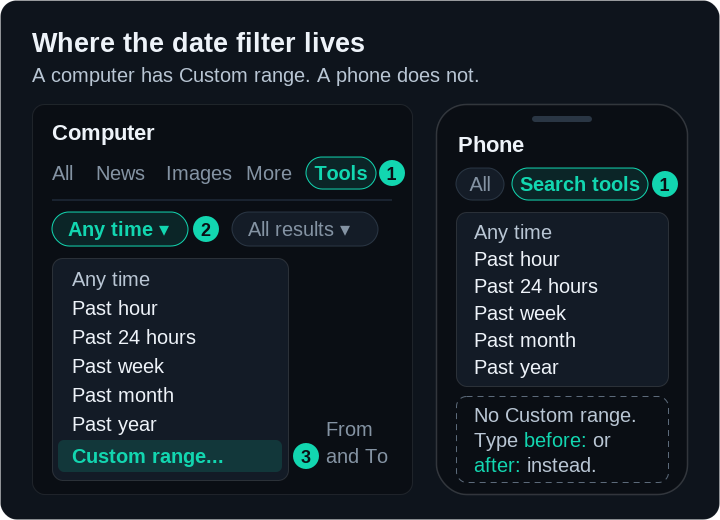
Google’s help page on search filters gives the same steps. We checked the menu labels on a live Google results page on November 11, 2026. The picture below shows where each one sits.
How to search Google for a custom date range
- Click Tools, then Any time, then Custom range… at the bottom of the list.
- A box called Custom date range opens, with a From field and a To field.
- Type both dates and click Go.
Google then adds the range to the page address as tbs=cdr:1,cd_min:1/1/2024,cd_max:12/31/2024. In the US, the dates are month, day, year.
Custom range only exists on a computer. On a phone browser, the time list stops at Past year. We saw this in the mobile Google page we fetched on November 11, 2026. A 2021 report from 9to5Google noted the same gap. On a phone, use the operators below.
There is one more place with a date menu. Google’s Advanced Search page has a Last update field with the same choices, from Past hour to Past year. It has no custom range either.
How to search Google before or after a date
Type before: or after: and a date right into the search box. Google’s help page on refining searches says these find pages “last updated” before or after that date. Use a year, or a full date written year, month, day.
| Type this | You get pages dated |
|---|---|
pancake recipe before:2020 | Before 2020 |
pancake recipe before:2020-01-01 | Before January 1, 2020 |
pancake recipe after:2026-10-01 | From October 1, 2026 on |
pancake recipe after:2024-01-01 before:2024-12-31 | In 2024 |
Four rules make them work:
- No space after the colon.
after:2026-10-01works.after: 2026-10-01does not. - Use both for a range. Put
after:andbefore:in the same search. - Watch the end date. In our Google News test,
after:included its own day, butbefore:stopped at the start of its day. To include all of December 31, 2024, typebefore:2025-01-01. - They work on any device, because they are part of the search words. On a phone, they are the only way to set exact dates.
Google still treats them as a test. Google first tried them in April 2019. In May 2025, its Search Liaison said they were still in beta, as Search Engine Roundtable reported. So Google could change them. For the other operators that still work, see our Google search operators guide.
People also use before: to skip newer pages, for example to find articles written before AI writing tools were common. That works, with one catch we found in our test below: a page can be dated by its first publish date even after big edits.
How to filter Google search by date on your phone
On a phone, tap Search tools under the search box, then pick a time. The name differs a little by app.
| Where you search | What to tap |
|---|---|
| Chrome or Safari on a phone | Search tools, then the time menu |
| Android phone or tablet | Search tools, then the time menu |
| Google app on iPhone | Tools, then the time menu |
You may need to swipe the row of tabs to see Search tools, as Google’s Android steps point out. To remove the filter, scroll to the end of that row and tap Clear. In the phone page we fetched, the time list had no Custom range, so type after: or before: for exact dates.
We also checked that the operators work on a phone. On November 11, 2026, we searched mortgage rates after:2026-10-11 as a phone browser. All 8 results showed dates from October 14 to November 11, 2026.
How to use date filters in a Google search URL
Add &tbs=qdr:w to the end of a Google search address to show only the past week. The Tools menu does the same thing, and you can see the code in the address bar after you pick a time.
| Add to the URL | Same as |
|---|---|
tbs=qdr:h | Past hour |
tbs=qdr:d | Past 24 hours |
tbs=qdr:w | Past week |
tbs=qdr:m | Past month |
tbs=qdr:y | Past year |
tbs=cdr:1,cd_min:1/1/2024,cd_max:12/31/2024 | Custom range |
These are the exact values behind Google’s own menu links on November 11, 2026. A number after the letter sets a longer span, so tbs=qdr:m6 means the past six months. It worked in our two spot checks: every dated result was from the past six months.
A full link looks like this:
https://www.google.com/search?q=mortgage+rates&tbs=qdr:wOur list of Google search parameters covers the rest of the address codes, like hl for language and gl for country. To search as if you were in another city, build the link with our Google location changer, then add &tbs=qdr:w to the end.
How to search Google News by date
News results have the same date menu, and their dates are more exact. You have three options.
- The News tab in Google Search. Search, click News, then Tools and Any time. On November 11, 2026, the list had the same choices as normal search, Custom range included.
- news.google.com. Search, then open the down arrow in the search box. Google News Help says you can set a date range there.
- The
when:operator. In Google News, addwhen:1dfor the past day orwhen:7dfor the past week, likenasa when:1d. Google’s help pages do not list it, so we tested it.
We ran five when: searches through the Google News feed on November 11, 2026. All 383 stories were inside the window. The oldest story in a when:1d search was 23.9 hours old. The oldest in a when:7d search was 6.9 days old. Two more searches with after:2026-11-01 before:2026-11-06 returned 170 stories, all from the start of November 1 to the start of November 6, Pacific time.
News dates are exact because every story in the feed carries a time stamp. Normal web pages are messier, as our test shows.
How often is Google’s date filter wrong? We tested it
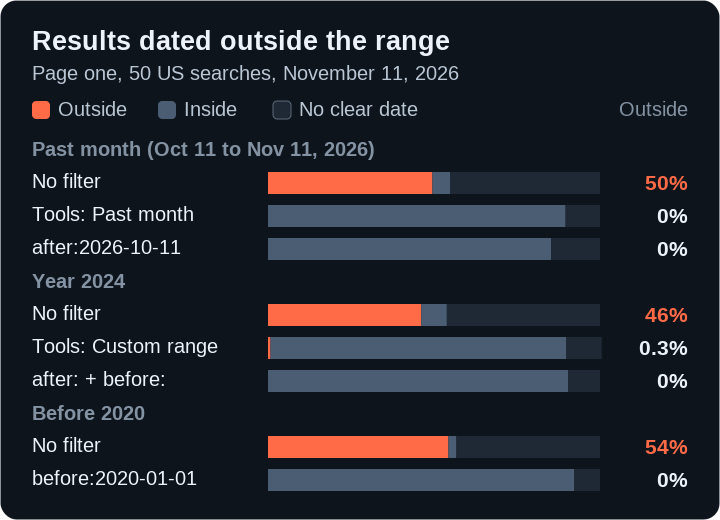
By Google’s own dates, almost never. On November 11, 2026, we ran 50 searches with five date filters. Only 1 of the 1,505 filtered results that showed a clear date fell outside the range. It was a Microsoft Learn page dated July 9, 2025, in a search for pages from 2024.
Here is how we ran it:
- 50 searches on mixed topics, from mortgage rates to sourdough bread recipe. The full list is in the data file.
- Six versions of each: no filter, Tools Past month (
tbs=qdr:m),after:2026-10-11, Tools Custom range for 2024,after:2024-01-01 before:2024-12-31, andbefore:2020-01-01. - Page one of US, English, desktop Google, fetched through DataForSEO’s SERP API with the full Google address in its url field. That is 300 results pages. One came back empty.
- Only the normal blue links, 2,094 of them, judged by the date Google printed next to each one, like “Oct 15, 2026” or “5 days ago”.
- One day of slack at each end of a range. A vague date like “2 years ago” counted only if it was clearly inside or outside.
The chart below shows the result for each filter, next to the same searches with no filter.
| Filter | Results | Inside | Outside | No clear date |
|---|---|---|---|---|
Tools: Past month (tbs=qdr:m) | 280 | 251 | 0 | 29 |
after:2026-10-11 | 285 | 243 | 0 | 42 |
| Tools: Custom range, 2024 | 385 | 343 | 1 | 41 |
after:2024-01-01 before:2024-12-31 | 367 | 332 | 0 | 35 |
before:2020-01-01 | 363 | 335 | 0 | 28 |
Three more things stood out:
- The filters really change the page. With no filter, only 22 of 414 results were dated in the past month, and only 10 were dated before 2020.
- Tools and operators did equally well. Past month and
after:both had zero results outside. Custom range andafter:withbefore:were nearly the same. - A filter makes Google show dates. With a filter on, 91 percent of results printed a date. With no filter, 57 percent did.
We also opened the pages
A match with Google’s printed date only shows that Google agrees with itself. So we picked 60 filtered results at random and opened them. We skipped Reddit, YouTube and social sites, and two results were the same page, which left 58 pages. For each one, we read the dates in the page’s code and text.
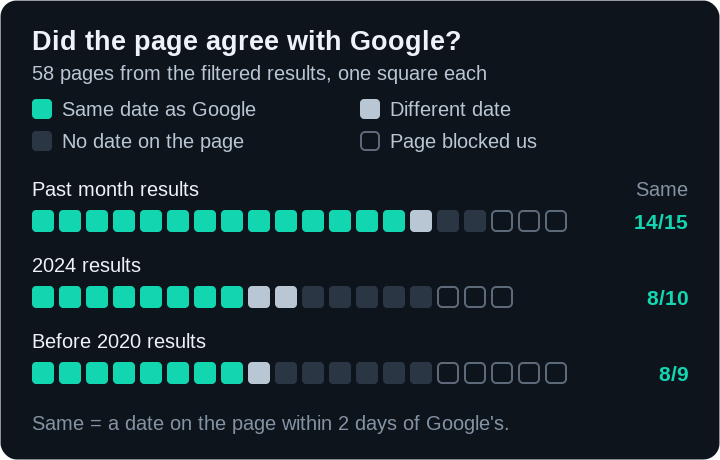
- 30 of the 34 pages with a date agreed with Google within two days.
- Only 2 had no date at all inside the range. A housing market post that showed up under
after:2026-10-11said it was published October 6, 2026, five days too early. An iPhone backup guide Google dated October 28, 2024 said it was posted in 2020 and updated in 2026. - 13 pages had no date we could find, and 11 blocked our request, so we could not check them.
“Agreed” hides the real lesson, though. Google picks one date per page, and it is not always the one you expect.
| Filter group | What the pages said | Pages |
|---|---|---|
| Past month results | An older page with a recent edit, dated by that edit | 6 of 15 with a date |
| 2024 and before 2020 results | The page changed after the range ended, but Google still listed it | 7 of 19 with a date |
A sourdough recipe first posted on October 24, 2017 showed up under after:2026-10-11, dated October 28, 2026. That is the date the page gives for its last update. A mortgage rates page first published in 2022 showed up under Past month the same way. Going the other way, 7 pages in the 2024 and before 2020 results said they had been changed after the range ended. Google still listed them, mostly under their first publish date.
So a past-month search finds pages that changed in the past month. Some of them are not new at all. And before: can return old pages that have since been rewritten.
Limits of this test
- It covers one day, one country, desktop and page one only.
- We read the date Google printed, as DataForSEO parsed it. We checked 1,211 of those dates against the snippet text, and all of them matched.
- 25 filtered results had vague dates like “2 years ago” that straddled the edge of a range. We left them out of both inside and outside.
- A page’s own code can carry the wrong date too. The page check is a sample of 58, not a full audit.
The CSV has every result, its printed date, our verdict, and the page check for the 60 sampled results.
Why Google shows old pages in a recent search
Google does not know the true date of most pages. It makes a guess, and the filter uses that guess. Five things get in the way.
- Dates are estimates. Google weighs the date on the page, structured data and other signals. Its guide to publication dates says it “doesn’t depend on a single date factor because all factors can be prone to issues.”
- Edits can count as new. Google’s help says the operators look at when a page was last updated. In our page check, 6 of the 15 dated past-month pages were older pages with a fresh edit.
- Some results show no date at all. 150 of the 1,680 filtered results printed none. You have to trust the filter on those.
- Each site marks dates its own way. Google’s Search Liaison made this point in May 2025, in the same post about the beta.
- The filter itself can break. On August 1, 2026, the Tools time filters stopped working for many people. Google’s Rajan Patel said a fix shipped the next morning, as Search Engine Roundtable reported. Android Authority confirmed the fix a few days later.
Date-filtered results also move from day to day, like any other results page. Our guide on why Google rankings fluctuate explains the causes.
Which date method should you use?
The chart below sums it up. In short:
- For recent results, use Tools. Past week or Past month is quick, and it held up in our test.
- For exact dates on a computer, use Custom range or
after:withbefore:. They did equally well. - For exact dates on a phone, type the operators. There is no Custom range.
- For news, use the News tab or
when:in Google News. News dates are the most exact. - For a saved link or a script, put
tbs=in the URL.
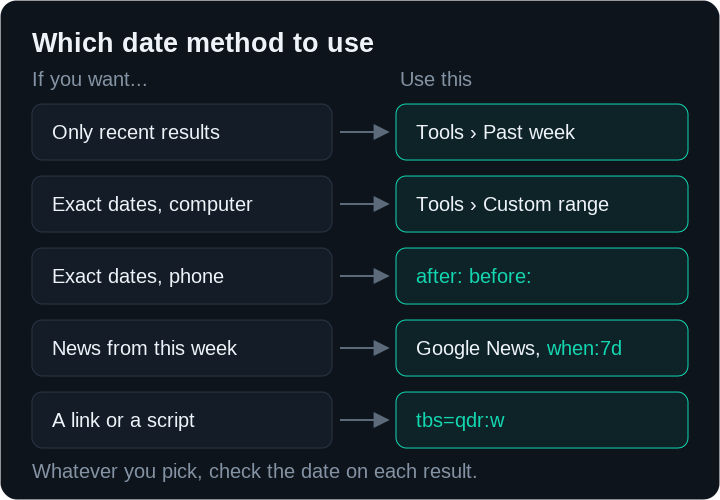
Whatever you pick, look at the date printed on each result. If it matters, open the page and check for an “updated” line.
How to check dated results for many keywords
Searching by hand works for a few topics. Hundreds of fast searches from one computer can bring up Google’s unusual traffic check, though.
If you want to see what changed this week on 200 keywords, every week, run the searches through a SERP API. Ours takes a full Google address in its url field, so tbs=qdr:w goes through as you wrote it. You can also put after: and before: straight into the keyword.
Frequently asked questions
How do I search Google by date?
On a computer, search as usual, click Tools under the search box, then Any time. Pick Past hour, Past 24 hours, Past week, Past month, Past year or Custom range. On any device you can also type before: or after: with a date, like seo tips after:2026-10-01.
Where did the date range option go in Google?
It is still there, inside Tools. Click Tools at the end of the row of tabs under the search box, then Any time. On a phone it is called Search tools, and you may need to swipe the tabs to find it. Phones have no Custom range, so use before: and after: for exact dates.
How do I search Google before a specific date?
Type before: and the date with no space, like budget template before:2020-01-01. Use a year or a full date written year, month, day. In our Google News test, before: stopped at the start of the date you typed, so set it one day after the last day you want.
Can I use a custom date range on my phone?
Not from the menu. In the mobile Google page we checked on November 11, 2026, Search tools offered Past hour to Past year but no Custom range. Type after:2024-01-01 before:2025-01-01 with your words instead. The operators work on any device.
Is Google's date filter accurate?
By Google's own dates, almost always. In our November 11, 2026 test, 1 of 1,505 filtered results with a clear date fell outside the range. The catch is how Google dates a page. It often uses the last edit, so a past-month search can return old articles with small updates. About 9 percent of filtered results showed no date at all.
How do I search Google News by date?
Click the News tab, then Tools and Any time, which includes Custom range on a computer. On news.google.com, open the down arrow in the search box to set a date range, or add when:1d or when:7d to your search. In our test, all 383 stories from five when: searches were inside the window.
Sources and further reading
- Google Search Help: Narrow your search results with filters support.google.com
- Google Search Help: Refine web searches (before: and after:) support.google.com
- Google Search Central: Publication dates in Google Search developers.google.com
- Google News Help: Find what you want on Google News support.google.com
- Google Account Help: Access and control activity in your account support.google.com
- 9to5Google: Google tests before: and after: date commands (April 9, 2019) 9to5google.com
- 9to5Google: Custom range freezes Google Search on desktop, not offered on mobile (January 19, 2021) 9to5google.com
- Search Engine Roundtable: Google before: and after: operators still in beta (May 6, 2025) seroundtable.com
- Search Engine Roundtable: Google Search filter by recent broken, then fixed (August 2, 2026) seroundtable.com
- Android Authority: Google fixes the Search time filter bug (August 6, 2026) androidauthority.com
- DataForSEO docs: Google Organic SERP task fields, including url docs.dataforseo.com