Tavily charges in credits. Every account gets 1,000 free credits a month, with no credit card. After that, you pay $0.008 per credit on pay-as-you-go, or $30 to $500 a month on a plan, which brings a credit down to $0.0075 to $0.005. A basic search costs 1 credit and an advanced search costs 2. So 1,000 searches cost between $5 and $16, as of November 2026.
We make Serplify, a Google SERP API. Tavily does a different job, and we say below where each one fits. We checked every Tavily number below on tavily.com and in Tavily’s docs on November 11, 2026. We also ran our own test through Tavily’s free keyless mode. The links are under sources.
What is Tavily?
Tavily is a search API built for AI agents. You send a question, and it returns web results with the most useful text from each page already pulled out. A model can read that text right away, without a separate scraper.
One account reaches five endpoints:
- Search: web results with short text snippets from each page. This is the one most agents use.
- Extract: clean text from up to 20 web addresses you already know.
- Map: a list of the page addresses on a website.
- Crawl: Map plus Extract. It walks a site and returns the text of each page.
- Research: an agent that searches many times and writes a report with citations.
Tavily also has an official remote MCP server for Claude, Cursor and other agent apps, plus SDKs for Python and JavaScript.
Who owns Tavily now?
Nebius, an AI cloud company, announced a deal to buy Tavily on February 10, 2026. Nebius said Tavily would keep its brand and keep serving its customers. It did not share the price. Tavily’s own docs index now calls Tavily part of the Nebius product portfolio. The logo on tavily.com reads “Tavily by Nebius.”
Tavily pricing plans (November 2026)
Here are the plans from Tavily’s credits and pricing docs, checked on November 11, 2026. The rate limits come from Tavily’s rate limit page.
| Plan | Price | Credits per month | Price per credit | Basic searches it covers | Requests per minute |
|---|---|---|---|---|---|
| Researcher | Free | 1,000 | Free | 1,000 | 100 |
| Project | $30 a month | 4,000 | $0.0075 | 4,000 | 1,000 |
| Bootstrap | $100 a month | 15,000 | $0.0067 | 15,000 | 1,000 |
| Startup | $220 a month | 38,000 | $0.0058 | 38,000 | 1,000 |
| Growth | $500 a month | 100,000 | $0.005 | 100,000 | 1,500 |
| Pay as you go | $0.008 per credit | As many as you use | $0.008 | Any | 1,000 |
| Enterprise | Custom | Custom | Custom | Custom | Custom |
On tavily.com/pricing, the paid plans sit behind one slider that starts at “Project, $30.” The docs table above lists every step.
Turn the price per credit into a price per 1,000 searches, and you get this:
| Plan | Per 1,000 basic searches | Per 1,000 advanced searches |
|---|---|---|
| Pay as you go | $8.00 | $16.00 |
| Project | $7.50 | $15.00 |
| Bootstrap | $6.67 | $13.33 |
| Startup | $5.79 | $11.58 |
| Growth | $5.00 | $10.00 |
Billing rules that matter
The list price is only part of the bill. These rules change what you really pay:
- Credits reset on the 1st. Tavily’s pricing FAQ says monthly credits reset on the first day of each month, no matter when you were billed. It says nothing about rollover, so treat unused credits as lost.
- When credits run out, requests stop. That is, unless you upgrade or turn on pay-as-you-go. Pay-as-you-go then charges $0.008 for each credit past your plan’s limit.
- You can cap spending. Going past a key limit or your plan’s limit returns error 432. Going past your pay-as-you-go limit returns error 433, says the Search API reference.
- Plan changes are usually prorated. An upgrade charges the difference for the rest of the cycle. A downgrade starts at the next cycle, says Tavily’s FAQ.
- Some limits are the same on every plan. Crawl and Map allow 100 requests per minute and Research allows 20, even on Growth.
The rate limit page also lists a “Scale” plan at 1,500 requests per minute. It has no public price.
How many credits does each Tavily endpoint use?
Each endpoint has its own credit rule. The chart below shows what one call costs, from Tavily’s docs.
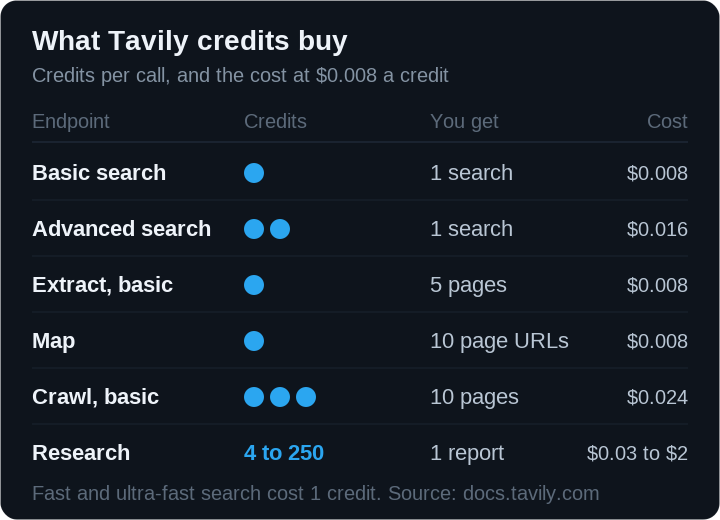
| Endpoint and option | Credits | Cost per call at $0.008 | Cost per 1,000 |
|---|---|---|---|
| Search: basic, fast or ultra-fast | 1 per search | $0.008 | $8 per 1,000 searches |
| Search: advanced | 2 per search | $0.016 | $16 per 1,000 searches |
| Extract: basic | 1 per 5 pages that work | $0.0016 per page | $1.60 per 1,000 pages |
| Extract: advanced | 2 per 5 pages that work | $0.0032 per page | $3.20 per 1,000 pages |
| Map | 1 per 10 pages found | $0.0008 per page | $0.80 per 1,000 pages |
| Map with instructions | 2 per 10 pages found | $0.0016 per page | $1.60 per 1,000 pages |
| Crawl: basic | 3 per 10 pages | $0.0024 per page | $2.40 per 1,000 pages |
| Crawl: advanced | 5 per 10 pages | $0.004 per page | $4.00 per 1,000 pages |
| Research: mini | 4 to 110 per report | $0.032 to $0.88 | $32 to $880 per 1,000 reports |
| Research: pro | 15 to 250 per report | $0.12 to $2.00 | $120 to $2,000 per 1,000 reports |
Search
The search_depth setting picks the price. Tavily offers four depths:
- ultra-fast costs 1 credit. It aims for the lowest wait and returns one short summary per page.
- fast costs 1 credit. It trades a little relevance for speed.
- basic costs 1 credit. This is the default.
- advanced costs 2 credits. Tavily says it gives the most relevant results, with more wait.
Each search returns up to 20 results. The default is 10. Asking for more results does not change the credit cost.
One setting can double your bill without warning. If you turn on auto_parameters, Tavily may switch the search to advanced on its own. The docs say to set search_depth yourself if you want to control cost.
Extract, Map and Crawl
Extract and Map charge per page, not per call. Pages that fail are free. Tavily’s docs say you are never charged when a page extraction fails or a map request fails.
Crawl adds the two costs together. Tavily’s own example: crawling 10 pages with basic extraction costs 1 credit for the map and 2 for the extraction, so 3 credits. With advanced extraction, it costs 5. A crawl stops at 50 pages unless you raise the limit.
Research
Research has a moving price. Each report costs between a floor and a ceiling. The mini model costs 4 to 110 credits, and pro costs 15 to 250. The default model is auto, which lets Tavily pick. At the pay-as-you-go rate, one pro report can cost up to $2.
What counts as a credit on Tavily?
Tavily’s docs answer most of this. We checked the rest ourselves on November 11, 2026, using the usage field that Tavily returns when you ask for it.
| What happens | Credits used |
|---|---|
| A basic, fast or ultra-fast search | 1 |
| An advanced search | 2 |
auto_parameters switches a search to advanced | 2 |
Adding an AI answer (include_answer) | No extra credit (we saw 1 credit on a basic search) |
Adding full page text (include_raw_content) | No extra credit (we saw 1) |
| Asking for 20 results instead of 10 | No extra credit (we saw 1) |
| Extracting 5 pages in one call (basic) | 1 (we saw 1) |
| The same search again, answered from Tavily’s cache | Still counted (we saw 1 credit on a reply that took 0 seconds on Tavily’s side) |
| A page that fails to extract | 0 |
| A map request that fails | 0 |
| A search or extract in keyless mode | 0, but capped per hour |
The cache row matters for agents. Agents often repeat the same search. On Tavily, a repeat still costs a credit, so caching in your own code saves money.
Is Tavily free?
Yes, for small projects. The free Researcher plan gives you 1,000 credits a month, with no credit card. That is 1,000 basic searches, or about 33 a day. It allows 100 requests per minute.
There are three more ways to use Tavily for free:
- Keyless access. Tavily’s keyless mode runs Search and Extract with no account and no key. You add one header,
X-Tavily-Access-Mode: keyless. Tavily says replies are the same as with a key. The catch is an hourly cap that Tavily does not publish. In our test, 27 searches went through in the first 7 minutes. After that, most requests came back with error 429 and the codehourly_cap_reached, and we got about one search every 2 to 15 minutes. - Students. Tavily’s FAQ says it is free for students. You email support to check if you qualify.
- Startups. The startup program gives 100,000 credits for 6 months. If you are not accepted, Tavily says you still get 10,000 free credits.
There is also a way to pay with no account at all. Through x402, an agent pays for each advanced search with a stablecoin (USDC). Tavily lists the price at $0.01 per call, which is less than the $0.016 an advanced search costs on pay-as-you-go. It covers advanced Search only.
What Tavily costs an AI agent: 100, 1,000 and 10,000 searches a day
Here is the monthly bill at three sizes. We use a 30-day month and pick the cheapest setup for each, using November 2026 prices. “Pay-as-you-go” here means extra credits at $0.008 on top of a plan, which is how Tavily’s docs describe it.
| Searches a day | Searches a month | Basic search | Advanced search |
|---|---|---|---|
| 100 | 3,000 | $16 (free plan plus 2,000 pay-as-you-go credits) | $40 (free plan plus 5,000 pay-as-you-go credits) |
| 1,000 | 30,000 | $220 (Startup plan) | $396 (Startup plus 22,000 pay-as-you-go credits) |
| 10,000 | 300,000 | $2,100 (Growth plus 200,000 pay-as-you-go credits) | $4,500 (Growth plus 500,000 pay-as-you-go credits) |
Three things stand out:
- Depth matters more than plan. Switching from advanced to basic cuts the bill nearly in half at every size.
- Big volume costs more per search. At 10,000 a day, the Growth plan runs out early and the rest is billed at $0.008. That works out to $7 per 1,000 basic searches, not $5. At that size, ask Tavily for an Enterprise quote.
- Rate limits are not the problem. Even 10,000 searches a day is about 7 per minute. Every paid plan allows 1,000 or more.
Count searches, not tasks. An agent often searches several times to answer one question. If each task runs 5 searches, 200 tasks a day already puts you in the 1,000 row.
Which Tavily plan is cheapest for your volume?
Plans and pay-as-you-go cross over at fixed points. We worked them out from the prices above:
| Credits you use a month | Cheapest setup |
|---|---|
| Up to 1,000 | Free plan |
| 1,000 to 4,750 | Free plan plus pay-as-you-go |
| 4,750 to 12,750 | Project ($30) plus pay-as-you-go |
| 12,750 to 30,000 | Bootstrap ($100) plus pay-as-you-go |
| 30,000 to 73,000 | Startup ($220) plus pay-as-you-go |
| Over 73,000 | Growth ($500) plus pay-as-you-go, or ask about Enterprise |
Remember that one advanced search uses 2 credits. So 20,000 advanced searches a month means 40,000 credits, which lands in the Startup row.
Our test: Tavily’s speed, and how often it matched Google
On November 11, 2026, we sent real searches to Tavily in keyless mode, with no account. We used 13 everyday US English queries in five groups: how-to questions, product research, coding, news and local. Each ran at basic and advanced depth with 10 results. A few also ran at fast and ultra-fast. For the same queries, we pulled Google’s first page (US, desktop) through DataForSEO. That cost us $0.10.
What we did not test: result quality. We did not judge whether Tavily’s sources were better or worse than Google’s. We had no paid key, so we cannot say whether paid plans are faster. The sample is small and comes from one day. You can download the data (CSV) and check every row.
Every call used the credits the docs list
All 13 basic searches used 1 credit each, and all 13 advanced searches used 2. The 9 fast and ultra-fast searches used 1 each. Asking for 20 results, an AI answer or full page text did not add credits. Extracting 5 pages in one call used 1 credit.
Advanced search took about a second longer
The chart below shows Tavily’s own timing for each search. The median was 0.05 seconds for ultra-fast, 0.41 for fast, 1.5 for basic and 2.3 for advanced. The trip from our computer added about 0.7 to 0.9 seconds on top.
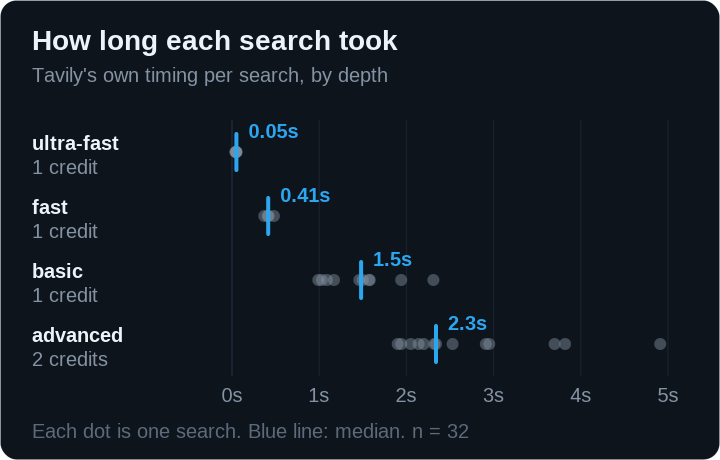
So fast costs the same as basic and answered in under half a second. If your agent waits on every search, try fast before you pay for advanced.
Tavily rarely returned the same pages as Google
Of Tavily’s basic results, about 11 in 100 were the exact page Google showed on its first page. Another 23 came from a site Google showed, but a different page. That was often a big site such as Reddit, YouTube or Stack Overflow. Advanced matched Google a bit less. Basic and advanced shared about 68% of their results.
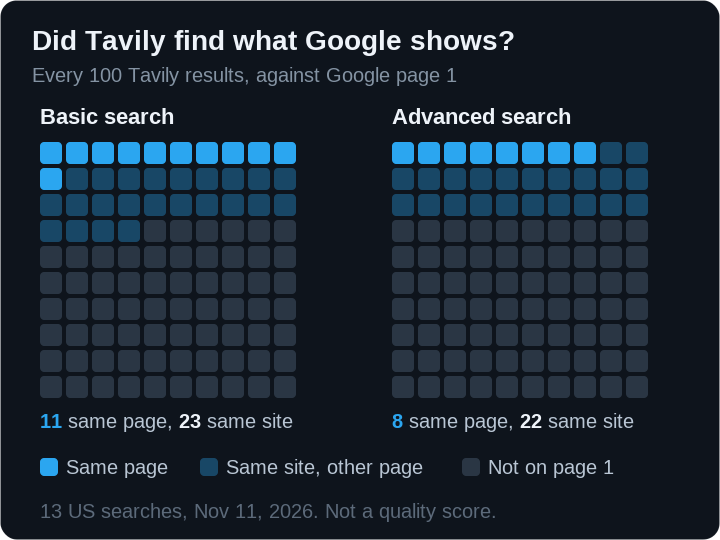
That is not a flaw. Tavily ranks pages for what helps a model, not to copy Google. For “python read csv file,” it returned Python’s own docs and the pandas docs. Google’s first page showed neither. But if your job is to know what Google shows, Tavily cannot tell you.
How to cut your Tavily bill
- Use basic, not advanced, by default. Advanced costs twice as much. Tavily’s own agent guide tells agents to prefer advanced for source discovery and comparisons. Follow that advice everywhere, and you double your bill. Save advanced for the hard questions.
- Try fast for speed, not ultra-fast for price. Fast, ultra-fast and basic all cost 1 credit. Pick by the wait you can accept, not by price.
- Set
search_depthyourself. If you useauto_parameters, Tavily may pick advanced for you at 2 credits. - Cache your own results. Tavily charges for repeats, even when it answers from its cache. Store answers to common searches for a few hours in your own app.
- Use Extract for pages you already know. Five extracted pages cost 1 credit. That is cheaper than searching again to get the same text.
- Keep crawls small. Run Map first to see how big a site is, then set Crawl’s
limitandmax_depth. Skipinstructionsunless you need them, since they double the map cost. - Choose mini for Research. Its ceiling is 110 credits. Pro can use up to 250 on one report.
- Set limits and watch usage. Put a spending limit on pay-as-you-go and on each key. Add
include_usageto requests to see the credits each call used.
Tavily alternatives compared
Prices come from each provider’s own page, checked on November 11, 2026.
| API | Where results come from | Price per 1,000 searches (November 2026) | Free allowance |
|---|---|---|---|
| Tavily | Tavily’s search, with page text in each result | $5 to $8 (basic), $10 to $16 (advanced) | 1,000 credits a month, no card; keyless mode |
| Brave Search API | Brave’s own index | $5 (Search plan) | $5 credit a month; card required |
| Exa | Exa’s own index, with page text | $4 (lite), $7 (auto), $12 (deep) | $10 credit a month plus a one-time $10 bonus; no card |
| Serplify | The live Google results page, up to 100 results | $5 per 1,000 successful SERPs | $1 once at signup, about 200 SERPs; no card |
| SerpApi | The live Google page, plus other engines | $25 (Starter) down to $9.17 (Big Data) | 250 searches a month |
The chart below puts the same five services side by side for one agent at 1,000 searches a day.
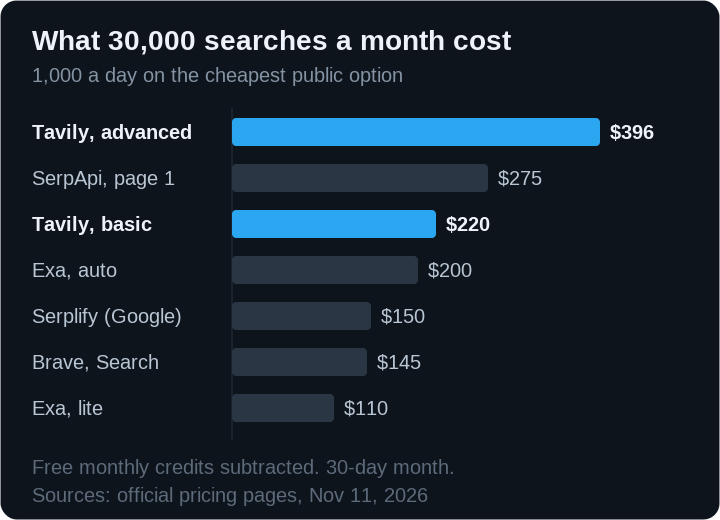
Here is the same math at all three sizes, per month:
| API | 100 a day | 1,000 a day | 10,000 a day |
|---|---|---|---|
| Tavily, basic | $16 | $220 | $2,100 |
| Tavily, advanced | $40 | $396 | $4,500 |
| Brave, Search plan | $10 | $145 | $1,495 |
| Exa, auto | $11 | $200 | $2,090 |
| Exa, lite | $2 | $110 | $1,190 |
| Serplify | $15 | $150 | $1,500 |
| SerpApi, page 1 | $75 | $275 | $2,175 |
Brave and Exa have their free monthly credit taken off. SerpApi uses its Developer plan at 100 a day and Big Data at 1,000. At 10,000 a day, it is three $725 Searcher plans a month, using early renewal. Serplify’s $1 signup credit is a one-time gift, so it is left out.
These services do not return the same thing, so price is not the whole story:
- Brave costs $5 per 1,000 and runs its own index. Its LLM Context endpoint returns page text for agents. You need a card to start, and its terms limit storing results. Our guide to Brave Search API pricing has the details.
- Exa is cheaper than Tavily at list price, and its search includes page text. Lite mode costs $4 per 1,000.
- Serplify, which publishes this blog, returns Google’s own results page as JSON, with up to 100 results, AI Overviews and People Also Ask. It does not pull text from the pages. Live requests are billed only when the SERP comes back.
- SerpApi also returns Google’s page and covers many other engines. It costs more per search at small volume.
Microsoft’s Bing Search APIs are gone, so they are not in the table. Our Bing Search API alternatives guide covers what replaced them.
Exa vs Tavily
Both are built for agents, and both return page text with each result. Here is how they differ on price, as of November 2026:
| Tavily | Exa | |
|---|---|---|
| Cheapest search | 1 credit: $5 to $8 per 1,000 | Lite: $4 per 1,000 |
| Standard search | Basic: $5 to $8 per 1,000 | Auto: $7 per 1,000 |
| Deeper search | Advanced: $10 to $16 per 1,000 | Deep: $12 per 1,000 |
| Full text of known pages | $1.60 per 1,000 pages (basic Extract, pay-as-you-go) | $1 per 1,000 pages |
| Research agent | 4 to 250 credits a report ($0.03 to $2) | $0.012 to $1.00 a run at fixed effort |
| Free allowance | 1,000 credits a month | $10 a month, about 2,500 lite searches |
Exa’s lite search, at $4 per 1,000, beats every Tavily price. Against Exa’s auto search at $7, Tavily’s basic search costs less from the Bootstrap plan up. Tavily has keyless access, while Exa has a bigger free allowance. We did not test which one finds better sources, so test both on your own questions before you pick.
When to use Tavily, and when you need Google results
Tavily is a good fit when:
- Your agent needs text, not links. Each result comes with snippets from the page, so the model can answer in one step.
- You want to start free. 1,000 credits a month, keyless access and no card make testing easy.
- You need crawling too. Extract, Map and Crawl sit under the same credits.
You need a Google SERP API instead when the job is about Google itself:
- Rank tracking. Tavily does not tell you where a page ranks on Google.
- AI Overviews and People Also Ask. These exist only on Google’s page. Our guide on how to track AI Overviews shows how to pull them.
- Matching what users see. If your users search on Google, Google’s own page is the one to check.
If you want an agent that searches Google directly, our Google search MCP server guide builds one in about 75 lines of Python. Serplify charges $0.005 per successful SERP, and new accounts get $1 of free credit with no card. See the pricing page for top-ups. For more Google APIs side by side, read our list of SerpApi alternatives.
Frequently asked questions
Is Tavily free?
Yes, up to a point. The free Researcher plan gives 1,000 API credits a month with no credit card, which covers 1,000 basic searches. Credits reset on the first day of each month. Tavily also offers keyless access to Search and Extract with no account, but it is rate-limited.
How much does Tavily cost per search?
A basic search costs 1 credit and an advanced search costs 2. At the pay-as-you-go rate of $0.008 per credit, that is $0.008 or $0.016 per search. On the $500 Growth plan, credits cost $0.005, so a basic search costs half a cent. Prices checked November 11, 2026.
What happens when I run out of Tavily credits?
Requests stop until your credits reset on the first of the month, unless you upgrade or turn on pay-as-you-go. With pay-as-you-go on, extra credits cost $0.008 each, up to a spending limit you set. Going past that limit returns error 433.
Do unused Tavily credits roll over?
Tavily's pricing FAQ says monthly credits reset on the first day of each month, whatever your billing date. It does not mention rollover, so plan as if unused credits are lost.
Who owns Tavily?
Nebius, an AI cloud company. Nebius announced a deal to buy Tavily on February 10, 2026, and said Tavily would keep its brand. Tavily's docs now describe it as part of the Nebius product portfolio.
Is Exa cheaper than Tavily?
Often, at list price. Exa's auto search costs $7 per 1,000 and lite costs $4, with $10 of free credit a month. Tavily's basic search costs $5 to $8 per 1,000 depending on the plan, and advanced costs twice that. We did not compare their result quality.
Sources and further reading
- Tavily docs: Credits and pricing docs.tavily.com
- Tavily: Pricing page and FAQ tavily.com
- Tavily docs: Rate limits docs.tavily.com
- Tavily docs: Search API reference (search depth, costs, error codes) docs.tavily.com
- Tavily docs: Extract API reference docs.tavily.com
- Tavily docs: Map API reference docs.tavily.com
- Tavily docs: Crawl API reference docs.tavily.com
- Tavily docs: Research API reference docs.tavily.com
- Tavily docs: Try Tavily without an API key (keyless access) docs.tavily.com
- Tavily docs: x402 machine payments docs.tavily.com
- Tavily docs: Agent setup guide (recommended defaults) docs.tavily.com
- Tavily docs: Search best practices docs.tavily.com
- Tavily docs: Frequently asked questions docs.tavily.com
- Tavily: Startup program tavily.com
- Tavily docs index (part of the Nebius product portfolio) docs.tavily.com
- Nebius: Nebius announces agreement to acquire Tavily (February 10, 2026) nebius.com
- Brave Search API: plans and pricing brave.com
- Exa: Pricing exa.ai
- Exa docs: Pricing exa.ai
- SerpApi: Plans and pricing serpapi.com
- Serplify docs: Pricing and wallet docs.serplify.io